Last updated: 29 September 2026
MAG box IPTV is the simplest setup of all. MAG boxes (MAG 322, 324, 420, 520 and similar models) are dedicated IPTV set-top boxes: plug them in, enter one portal address and watch. There is no app to install, which makes them a great choice for anyone who wants a simple, TV-like experience.
Before you start
- Your MAC address. MAG boxes are activated with their MAC address, not with a username and password. You find it on the sticker under the box, or in Settings → Device info.
- A stable connection. Plug the box into your router with an Ethernet cable whenever possible — at least 10 Mbps for HD, 20 Mbps for Full HD and 30–40 Mbps for 4K (test it with Speedtest).
- A few minutes. Once we have your MAC address, setup takes less than 5 minutes.
How to set up IPTV on MAG box
Step 1: Send us your MAC address
Turn your MAG box over: the MAC address is printed on the sticker and usually starts with 00:1A:79. Send it to us on WhatsApp — we link your subscription to your box and send you the portal URL.
Step 2: Open System Settings
Connect the MAG box to your TV and the internet, switch it on and, when the menu appears, open Settings → System settings.
Step 3: Go to Servers → Portals
Select Servers, then Portals.
Step 4: Enter the portal
In Portal 1 name type IPTV Ireland. In Portal 1 URL enter the portal URL we sent you, exactly as written. Press OK to save.
Step 5: Restart the box
Go back and choose Restart portal (or unplug the box for 10 seconds). The portal loads with your channels, TV guide and on-demand library.
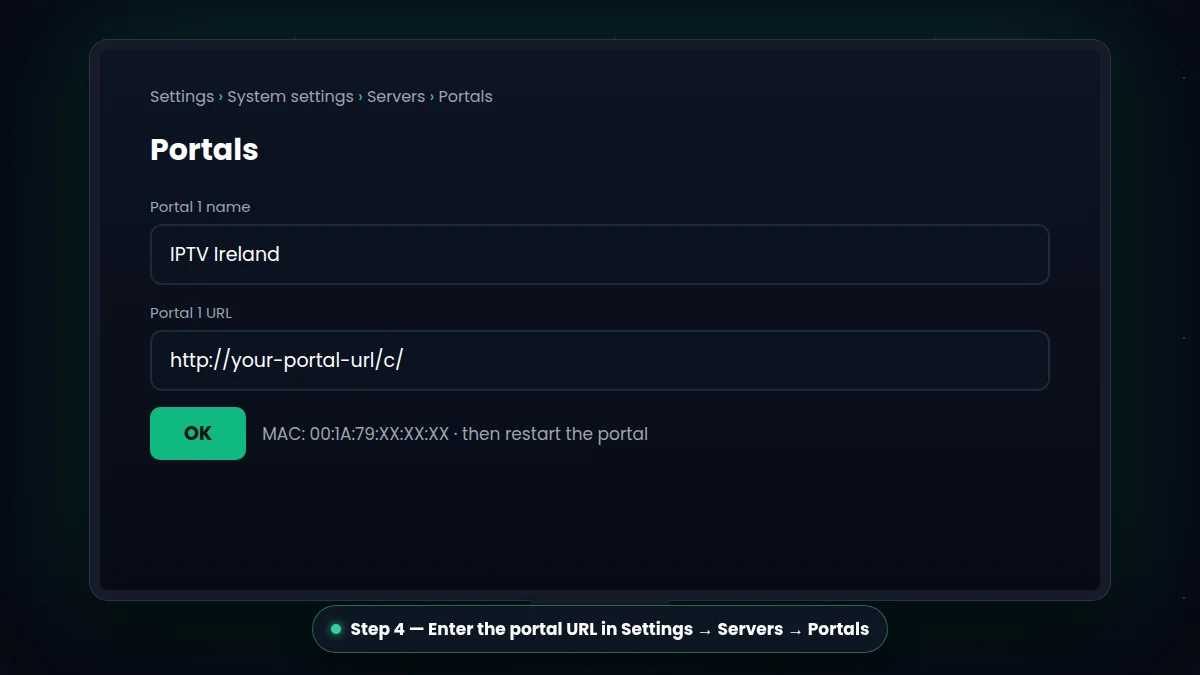
Tip: the portal URL must be typed exactly as we send it, including every slash at the end. One wrong character and the box shows a "portal not found" error.
Common MAG box problems
"Portal not found" or "loading portal" forever
Check the portal URL for typos, make sure the box is connected (Ethernet preferred) and restart it. If the MAC address was sent with a mistake, the portal cannot load — double-check it with us.
"STB blocked" or "MAC address not activated"
Your MAC address is not linked to an active subscription yet. Send us a photo of the error and of the sticker under your box; we fix it in minutes.
Picture freezes
Use an Ethernet cable, restart your router and your box, and read our guide to fix IPTV buffering.
Ready? Choose your IPTV plan or ask for a free 30-minute trial on your MAG box.
Send Your MAC Address on WhatsApp
More tips for IPTV on MAG box
Setting up IPTV on MAG box devices is quick, but a few details make the difference:
- Always send us the MAC address from the sticker, and double-check every character.
- Use an Ethernet cable — MAG boxes are designed for wired connections.
- After entering the portal, choose Restart portal so the new settings load.
- Update the box software in the system settings if your model offers updates.
Moving from a MAG box to a Firestick or Smart TV? Message us — we can move your IPTV on MAG box subscription to your new device.
What You Can Watch With IPTV on MAG Box